Introducing hsbView 29: Empowering Teams with Smarter Offsite Tools and Greater Autonomy
We are excited to announce hsbView 29, hsbcad's latest release of its standalone digital shop drawing viewer for offsite timber manufacturers. From a new, intuitive View Editor to enhanced visualizations and improvements to Solid 3D Render and the 3D Viewer, this update is designed to make your team work smarter and faster with accurate production data.
For those new to the platform, hsbView by hsbcad is a standalone, out-of-the-box solution that empowers small and medium offsite timber producers to embrace digital transformation, enabling fully paperless production. Immediate installation and activation ensure seamless access to the shop drawing files without delay. Designed to eliminate inefficiencies on the factory floor, it delivers instant dimension measurement, seamless setup, and a fully digital factory. Operators always work from the most current shop drawings, resulting in a streamlined, bottleneck-free production process that saves time, reduces errors, and drives measurable gains in production throughput.
At the core of hsbView are three powerful components: Element View provides instant access to the material list associated with every structural component; 3D View brings drawings to life with interactive visualization and detailed examination of specific zones; PDF View has easy access and ability to read designer PDF’s, eliminating information bottlenecks and allowing teams to focus on accurate production.
hsbView 29 elevates the existing, powerful features by improving the user experience while giving operators and production teams more control and flexibility.
If you are already a valued hsbcad customer, you can enjoy these new capabilities right away! Upgrading to Version 29 will give you instant access to all these new functionalities. You can initiate your upgrade by visiting the Downloads section of myhsbcad.com.
If you are new to hsbView and are looking to digitalize your offsite construction workflows, we invite you to see these tools in action. Contact us for a tailored demonstration to discover how hsbView 29 can unlock your offsite production potential.
What’s New in hsbView 29?
View Editor
hsbView 29 gives the user more control and independence. A more intuitive shop drawing editor lets users create and manage their own configurations without external support. From a guided, faster setup to advanced customization, teams can tailor and control how shop drawings are defined and used in daily workflows. The increased flexibility allows teams to adapt the shop drawings to their project-specific requirements.
hsbView 29 View Editor
Visualization Updates
hsbView 29 brings a significantly enhanced visual experience of the design data to the shop floor. The refreshed user interface and extended visualization capabilities allow the key assembly details, such as wall components, metal parts, and fastener assemblies, to be displayed directly within elements. These details are generated directly from the CAD model, reducing manual errors by leveraging the model’s data. This update provides the user with a clear, complete view of assembly details while improving confidence in production data.
hsbView 29 UI Overhaul
hsbView 29 New Visualization of Wall Icons
hsbView 29 New Visualization of Metal Parts
hsbView 29 New Visualization of Fastener Assemblies
Enhancements in Solid 3D Render
The Element View has been enhanced to deliver a more accurate and reliable 3D experience. The use of parallel projection improves the display of geometry and provides a clearer default isometric startup view. Users get an efficient representation of structural elements from the moment they open a project. Navigation between views is smoother, and the tighter integration between 3D visuals and the material list makes validating production data more efficient.
hsbView 29 Enhanced Solid 3D Render
Enhancements in 3D Viewer
The 3D Viewer in Version 29 has been updated for greater consistency and ease of use. A more accurate default view that uses parallel projection ensures users are immediately oriented when opening a model. hsbView 29 delivers improved stability when switching perspectives, creating a smoother, more predictable experience, allowing teams to focus on the work.
For a visual demonstration of new features in action, visit our YouTube channel to watch the latest hsbView 29 video.
Who Is hsbView 29 Designed For?
hsbView 29 is more than an update. It is a continuous commitment from hsbcad to always deliver the right tools in the hands of the people who need them the most. With smarter visualization, greater configurability, and a more intuitive experience from start to finish, we're proud to deliver a release that helps offsite timber manufacturers work with more confidence, more independence, and fewer interruptions.
How Do I Get hsbView 29?
If you are already a valued hsbcad customer, you can enjoy these new capabilities right away! Upgrading to Version 29 will give you instant access to all these new functionalities. You can initiate your upgrade by visiting the Downloads section of myhsbcad.com.
If you are new to hsbView and are looking to digitalize your offsite construction workflows, we invite you to see these tools in action. Contact us for a tailored demonstration to discover how hsbView 29 can unlock your offsite production potential.
hsbcad uses cookies to continuously improve its website visitors’ experience. First of all, cookies can directly enhance such experience, e.g. by remembering the choice of language or other specific settings. In addition, certain cookies provide hsbcad with statistical information about the use of its website, thus indirectly allowing it to better meet visitor preferences by adapting accordingly. Finally, cookies may facilitate certain third-party applications, such as social media network connections, and hence allow you to use certain additional features, e.g. ‘like’ something on Facebook, ‘tweet” something via Twitter, etc.
What exactly are cookies?
Cookies are small text files that your browser installs on your computer and that enable the website to recognize you upon your visit. It consists of a unique number and can hence distinguish you from other visitors, but does not contain any personal details. This means that hsbcad cannot identify you personally on the basis of such cookies, nor identify you when you visit third-party websites.
Thanks to cookies, hsbcad can for example make sure that the information appearing on your screen during your next visit to its website is tuned in to your preferences. With the help of cookies, hsbcad can also identify the most popular sections of its website, since they allow hsbcad to know which pages are visited and how much time visitors spend browsing the same. On the basis of these aggregated data, hsbcad can adjust its website to better reflect visitor preferences and offer a more customer-oriented experience. Finally, cookies may facilitate certain third-party applications such as social media network connections.
How we obtain your informed consent
Upon entering hsbcad’s website for the first time, you will be prompted to allow or refuse the use of cookies and you will be shown a link to this cookies policy for further information. The notification banner will no longer appear on your screen on future visits to the website, but the option to remove cookies or withdraw your consent to use cookies altogether will remain open to you via the settings of your internet browser (see below under ‘objection’).
Objection
It is possible to configure your browser in such a way that it allows or refuses the use of cookies or informs you every time a cookie is sent. Because not all browsers are alike, hsbcad advises you to consult the Help menu of your browser to know how you can delete cookies and/or (re)adjust your cookie preferences for the future.You may also withdraw your consent by sending an email to info@hsbcad.com in this regard. Note, however that disabling cookies may sometimes prevent you from having an optimal use of the website. hsbcad doesn’t exchange cookies with websites of third parties or external suppliers of data, with the exception of third parties working directly with hsbcad to provide website services.
For more information on the protection of your personal data, please see our Privacy Policy.
What data are gathered for which purposes?
When you visit the website, hsbcad can automatically collect the following technical information (which cannot identify you): your operating system and browser type, the domain name of another website that you used to get access to the website, the time and duration of your visit, which pages you have visited, etc.
These data will strictly be used for internal purposes, namely in order for hsbcad to study overall demographic data, behavior and interests. It will allow hsbcad to better tailor the website and its applications to the various needs and wishes of its visitors for it can thus better:
estimate its audience size and usage pattern;
store information about preferences and individual interests;
speed up searches; and
recognize you (anonymously) when you return to our site.
It is important to stress that, aside from remembering your settings on its website, hsbcad uses the gathered data exclusively for web statistics in Google Analytics, which means that the data is only used in an aggregated manner and strictly for internal purposes. hsbcad does not collect any personal information about its visitors and cannot identify you personally based on the gathered data.
Cookie summary
Name
Domain
Content and purpose
Valid
Functional cookies
LtpaToken2
boip.int, register.boip.int, filing.boip.int
Encrypted authentication token for SSO (single sign on)
Session duration
JSESSIONID
boip.int, register.boip.int, filing.boip.int
Standard java cookie, to attach browser to a server session. Each request of a user will be processed on the same cluster node
Session duration
bmbLanguage
register.boip.int
User language preference
13 months
bmbOptionalColumns
register.boip.int
User preference columns
13 months
bmbItemsPerPage
register.boip.int
User preference results per page
13 months
bmbSortColumn
register.boip.int
User preference sorting order
13 months
bmbStartPage
register.boip.int
User preference starting page
13 months
bmbFirstTrademark-Mutation
register.boip.int
User preference for showing mutations
13 months
Non-functional cookies
_utma
boip.int, filing.boip.int
Google Analytics Tracking cookie
2 years
_utmb
boip.int, filing.boip.int
Google Analytics Tracking cookie
30 minutes
_utmc
boip.int, filing.boip.int
Google Analytics Tracking cookie
Session duration
_utmz
boip.int, filing.boip.int
Google Analytics Tracking cookie
6 months
Privacy policy
The present privacy policy describes how we will use personal data you may provide to us. It may be updated from time to time. We therefore advise you to consult this page on a regular basis so that you are aware of changes, if any, and determine whether these are acceptable to you. This policy applies to all website visitors and service and application users, as well as to any and all means of access, including, but not limited to, desktop and laptop computers, public internet consoles and mobile devices.By submitting your personal data via this website, application or service you explicitly confirm your approval of the use thereof in accordance with this privacy policy.In addition, this privacy policy applies to other applications, contracts, etc. that include a link or reference to this privacy policy.In case you have any questions or remarks in this regard, please contact our customer service via the contact menu of our website or via the contact details under sections 11 or 16 below.The present privacy policy is drafted in conformity with Regulation (EU) 2016/679 of the European Parliament and of the Council of 27 April 2016 on the protection of natural persons with regard to the processing of personal data and on the free (hereinafter: the “GDPR”).
1. Definitions
“hsbcad” or “We”: hsbcad BVBA, a company incorporated under Belgian law, having its registered offices at Brouwerijstraat 1 b9, 9031 Ghent, Belgium and with company number 0475.468.363 “User(s)”:(a) user(s) of the Website or application, jointly or individually depending on the context, or, as the case may be, a licensee or (a) User(s) of hsbCAD’s products or services “Website”: the websites reachable via the following primary URLs: www.hsbcad.com as well as hsb academy (https://hsbcad.academy/) “Personal Data”: any information relating to an identified or identifiable natural person. “Affiliated Company”: a company that is part of the hsb Group and connected to hsbcad, for example their subsidiary companies.
2. Which personal data do we collect ?
On certain pages of its Website or applications, hsbcad will collect Personal Data about you. The data which hsbcad collects is data such as your name, address, telephone number, email address, curriculum vitae, website, financial details, username, password and gender but also your IP-address, browser type, internet service provider, device identifier, time zone settings, browser plug-in types and versions, as well as information collected from third parties (KBO register, Belgian State Gazette and other public websites and social media).
hsbcad further collects, stores and uses information about your visits to our Website and applications.
We do not generally collect sensitive personal data. Sensitive personal data includes personal data revealing a person’s racial or ethnic origin, religious or philosophical beliefs, or data concerning health. If we do collect sensitive or special personal data, we will ask for your explicit consent to our proposed use of that information at the time of collection.
3. The confidentiality of your personal data
hsbcad shall handle your Personal data in accordance with the terms of this privacy policy and the legal obligations applicable to the processing of Personal data.
hsbcad takes the protection of your personal data very seriously and has adopted adequate measures to protect your Personal Data against accidental or unlawful destruction, loss, alteration, unauthorized disclosure of, or access to, Personal Data transmitted, stored or otherwise processed
hsbcad optimizes the security of your Personal Data by i.a. using encryption, firewalls and password protection, requesting contractual guaranties from third parties, and limiting the access to your Personal data (e.g. by only giving access to the data to hsbcad employees who need those data for the Purposes as described below).
Where data processing is carried out on our behalf by a third party, we have taken the necessary steps to ensure that appropriate security measures are in place to prevent unauthorized access to or disclosure of your Personal Data.
Where you are asked to register as a User, hsbcad invites you to help securing your Personal data by avoiding the use of obvious passwords and/or user ID’s, by changing your password regularly and by making sure you do not share your username, password or other details with others or store them in an insecure way.
All Personal Data you provide to hsbcad are stored on secure servers. In addition, hsbcad and its service providers will always do their utmost to protect your Personal Data. However, the transmission of information via the internet can never be completely secure and the provision of Personal Data remains at your own risk at all times.
In the event of a data breach, hsbcad has put in place procedures to deal with a suspected breach and will notify you and any applicable regulator of a breach where required to do so.
If you would have the impression that your Personal Data is not adequately protected or if there are indications of abuse, please contact hsbcad via info@hsbcad.com.
4. How do we collect and retain your Personal data?
If you wish to use an area of the Website requiring registration or, as the case may be, of an application or forum, you will be asked to fill in the relevant information. In this case, hsbcad makes clear that it will only give you full access to the Website, application or forum area after submission of the requested information and acceptance of the relevant policies and terms and conditions.
In addition, hsbcad may collect your Personal Data when you:
create an online account as a User;
place an order or request;
subscribe to a newsletter;
participate in a competition, tombola or other promotion;
respond to questionnaires;
file a complaint or ask for information;
communicate with hsbcad by email, telephone or any other means.
hsbcad may combine Personal Data collected via the Website, application or forum with Personal Data provided to hsbcad in another way. It may retain these data in a single combined database or in several distinct databases. hsbcad shall avoid collecting Personal Data that are not relevant for the purposes as set out below and shall not retain the data longer than necessary for those purposes or, as the case may be, for the period as determined in an agreement or by law.
5. For what purposes do we use your Personal data ?
hsbcad may use the Personal Data it collects for the following purposes (“the Purposes”):
legal basis for the processing (e.g. tax and accounting purposes, money laundering checks, etc.);
registering you as a User on the Website, application or forum and running the Website or application services (including the processing of queries or requests for information concerning hsbcad and its services) as well as to allow you to efficiently use those services (e.g. blogs, forums and discussion pages);
ensuring that the Website’s content is presented to you in the most effective manner for you and your computer;
processing requests or orders placed via the Website;
processing and handling complaints or requests;
researching and analyzing the market as well as hsbcad’s customers, products and services (e.g. by asking your opinion on hsbcad’s products and services or by asking you to complete a survey or questionnaire);
helping hsbcad in evaluating, correcting and improving its services;
internal filing;
marketing, including providing you with information that you requested from hsbcad or which hsbcad feels may interest you, where you have consented to be contacted for such purposes (see section below on direct marketing);
organizing contests, competitions and/or other promotional activities;
recruitment (if you have provided information to hsbcad in this regard); and
notifying you about certain changes to hsbcad’s services.
All above-mentioned considerations apply to the use of your Personal Data by an Affiliated Company for the Purposes.
In case of reliance on legitimate interests, hsbcad will carry out a balancing test to ensure that your interests, rights and freedoms do not override our legitimate interests.
hsbcad will only use your Personal Data for the purposes for which we collected it, unless we reasonably consider that we need to use it for another reason and that reason is compatible with the original purpose. If we need to use your Personal Data for an unrelated purpose, we will notify you in a timely manner and we will explain the legal basis which allows us to do so.
6. To whom do we disclose your Personal data?
hsbcad will not provide your Personal Data to third parties without your permission, except:
to Affiliated Companies;
when such disclosure is necessary to permit hsbcad employees, agents, subcontractors, suppliers or commercial partners to provide a service or accomplish a task in the name of hsbcad (including providing marketing support, accomplishing market research or providing customer services), to manage your membership or license, to deliver existing or future products or services or for participation in contests, competitions and/or other promotional activities;
to hsbcad’s professional advisors;
to the buyer or potential buyer of hsbcad’s rights and duties related to the Website;
if such disclosure is necessary in order to protect legitimate interests of hsbcad, its customers, or if it is required or permitted by law.
As a User, you acknowledge that all information you provide using a tool that makes information visible to other persons (e.g. blogs, forums and discussion pages), will be made public by this tool. It is important to keep this in mind and use common sense and precaution when providing information via such tools.
Every disclosure by hsbcad of your Personal Data to a carefully selected third party or to one of the third parties mentioned in the list above is always made in accordance with applicable privacy laws. hsbcad warrants that stipulations are foreseen to make sure that third parties cannot use your personal data for other purposes than and according to the Purposes, and that these third parties have taken the necessary security measures. As the case may be, hsbcad has concluded data processing agreements with these third party processors to safeguard the protection of your personal data.
If and when you would be using secure online payment pages, your payment will be processed by a third-party payment processor, who specializes in the secure online capture and processing of credit/debit card transactions. If you have any questions regarding secure transactions, please contact us.
7. Automated Decision-making
hsbcad does not engage in automated decision-making that could have considerable consequences to persons. This entails decisions that are being taken by computer programs or systems, without intervention of a natural person (e.g. a collaborator of hsbcad).
8. How long do we keep your Personal Data?
hsbcad will not keep your Personal Data for longer than is necessary for the purposes for which it was collected and processed.
The criteria we use for retaining different types of Personal Data, include the following:
legal and regulatory requirements: we will retain the information for as long as legally required (e.g. accounting regulations)
general queries: we will retain your information for as long as necessary to respond to your queries. Subsequently, we will retain the information for one year after the last contact;
direct marketing: Information based on direct marketing purposes will not be retained for more than one year after the last active contact.
9. Data Protection Principles
hsbcad adheres to the following principles when processing your Personal Data:
Lawfulness, fairness and transparency: data must be processed lawfully, fairly and in a transparent manner.
Purpose limitation: data must be collected for specified, explicit and legitimate purposes and not further processed in a manner that is incompatible with those purposes.
Data minimisation: data must be adequate, relevant and limited to what is necessary in relation to the purposes for which they are processed.
Accuracy: data must be accurate and, where necessary, kept up to date.
Storage limitation: data must be kept in a form which permits identification of data subjects for no longer than is necessary for the purposes for which the personal data are processed.
Integrity and confidentiality: data must be processed in a manner that ensures appropriate security of the personal data, including protection against unauthorised or unlawful processing and against accidental loss, destruction or damage by using appropriate technical or organisational measures.
10. Direct Marketing
On registration pages or elsewhere on the Website or application concerned, you may be asked to indicate whether you wish to receive certain information by email and/or mail. If you do so, you thereby agree that hsbcad may use your Personal Data to provide you with information about its products, promotional activities and special offers as well as with any other information about products or services of hsbcad or Affiliated Companies that could be of interest to you according to hsbcad. Even if you have not indicated such preference but you are an existing customer of hsbcad, we may contact you by email or mail with information, but only about goods and services similar to those that were the subject of a previous sale to you.
At any given time, you may change your preferences regarding Direct Marketing by using the opt-out option contained in every direct marketing mailing or, if you are a User, by adapting your account. If you do this, hsbc will not delete your Personal Data from their database(s), but will note your changed preferences as soon as reasonably possible.
11. User rights with regard to Personal data
You have the right:
to access your personal data and to be informed about its use
to correct your personal data
to have your personal data deleted
to restrict the use of your personal data
to be forgotten
to object to the use of your personal data
to complain to a supervisory authority
to withdraw your consent to the use of your personal data
to ask for the portability of the personal data you shared with us
Users whose Personal Data are being processed are indeed entitled to request access to these data and, if the data would be incorrect, incomplete, unnecessary or outdated, have these data corrected or completed. hsbcad kindly asks you to help to make sure that the Personal Data in its records are as accurate and up-to-date as possible. If you believe that the Personal Data submitted to hsbcad is incorrect or incomplete, please notify customer service as described below. hsbcad will correct or adapt your Personal Data as soon as possible. Users having registered via the Website or application may also adapt their Personal data themselves in their accounts at all times.
If permitted by law, hsbcad may charge a small compensation for this service.
If you wish to exercise any of the above-mentioned rights, please notify hsbcad’s customer service, located at hsbcad’s registered offices (see below at the end), or send an email to info@hsbcad.com.
12. Links
The Website or applications may contain links to or from other websites or applications which are not controlled by hsbcad. hsbcad is not responsible for the protection or confidentiality of any data you may submit on such other websites. Before submitting information on such sites, we recommend that you read their privacy and other statements in that regard.
13. Complaint with a Supervisory Authority
You have the right to make a complaint at any time with a supervisory authority.
The supervisory authority in BELGIUM can be contacted at:
Gegevensbeschermingsautoriteit
Drukpersstraat 35, 1000 Brussel
+32 (0)2 274 48 00
+32 (0)2 274 48 35
14. Cookies
hsbcad is constantly seeking to improve the experience of its Users. That is why, for certain sections of the Website, cookies are used.
Cookies are small text files that your browser installs on your computer and that enable the Website to recognize you upon your next visit. With the help of cookies, hsbcad can identify the most popular sections of the Website, since they allow hsbcad to know which pages Users visit and how much time they spend browsing them. On the basis of these aggregated data, hsbcad can adjust the Website to better reflect User requirements and to offer a more customer-oriented experience. Thanks to cookies, hsbcad can for example make sure that the information that appears on your screen during the next visit to the Website is tuned in to your preferences as a User.
The Website, as well as certain notifications such as promotional e-mail messages, may contain web beacons. These are tiny images or objects embedded in a web page or email and are usually invisible to the User, but allow hsbcad to verify whether a User has viewed the page or email in question. Web beacons generally function in combination with cookies and hsbcad uses the two in the same manner.
15. Minors
Individuals under the age of 18 should not provide us with their Personal data without the consent and supervision of their parent or guardian. Without such permission, hsbcad does not wish to save Personal data from such individuals, nor process or forward such data to any third parties.
16. Applicable law
The law applicable to this privacy policy is Belgian law.
Data Controller:
hsbcad BVBA
Brouwerijstraat 1 b9,
9031 Ghent, Belgium
info@hsbcad.com
Legal
Software License and Services Agreement
IMPORTANT NOTICE: PLEASE READ VERY CAREFULLY BEFORE USING ANY hsbcad MATERIALS OR SERVICES. hsbCAD ONLY LICENSES AND PROVIDES THE hsbCAD MATERIALS AND SERVICES ON THE CONDITION THAT LICENSEE FULLY ACCEPTS AND AGREES WITH ALL OF THE TERMS AND CONDITIONS CONTAINED AND/OR REFERENCED IN THIS AGREEMENT.
BY CLICKING “ACCEPT” OR BY SELECTING OR CLICKING ANY OTHER BUTTON OR MECHANISM DESIGNED TO ACKNOWLEDGE AGREEMENT TO THE TERMS OF AN ELECTRONIC COPY OF THIS AGREEMENT, OR BY COPYING, INSTALLING, DOWNLOADING, ACCESSING OR USING ANY HSBCAD SOFTWARE OR OTHER MATERIALS OR SERVICES IN WHOLE OR IN PART, YOU (1) ACCEPT ALL OF THE TERMS AND CONDITIONS OF THIS AGREEMENT INCLUDING, IN PARTICULAR, THE LIMITATIONS ON: USE CONTAINED IN SECTION 3; TRANSFERABILITY IN SECTION 5; WARRANTY AND LIABILITY IN SECTIONS 8, 9 AND 10; AND SPECIFIC PROVISIONS AND EXCEPTIONS IN SECTION 15. YOU AGREE THAT THIS AGREEMENT IS LIKE ANY WRITTEN NEGOTIATED AGREEMENT SIGNED BY YOU. THIS AGREEMENT IS ENFORCEABLE AGAINST YOU AND ANY LEGAL ENTITY THAT OBTAINED THE SOFTWARE AND/OR ON WHOSE BEHALF IT IS USED: FOR EXAMPLE, IF APPLICABLE, YOUR EMPLOYER; (2) ACCEPT ALL OF THE ABOVE MENTIONED UNDER (1) ON BEHALF OF THE ENTITY FOR WHICH YOU ARE AUTHORIZED TO ACT (E.G. AN EMPLOYER) AND ACKNOWLEDGE THAT SUCH ENTITY SHALL BE LEGALLY BOUND BY THIS AGREEMENT (AND YOU AGREE TO ACT IN A MANNER CONSISTENT WITH THIS AGREEMENT) OR, IF THERE IS NO SUCH ENTITY FOR WHICH YOU ARE AUTHORIZED TO ACT, YOU ACCEPT ALL OF THE ABOVE MENTIONED UNDER (1) ON BEHALF OF YOURSELF AS AN INDIVIDUAL AND ACKNOWLEDGE THAT YOU ARE LEGALLY BOUND BY THE SAME; (3) REPRESENT AND WARRANT THAT YOU HAVE THE RIGHT, POWER AND AUTHORITY TO ACT ON BEHALF OF AND BIND SUCH AFOREMENTIONED ENTITY (IF ANY) OR YOURSELF. YOU MAY NOT ACCEPT THIS AGREEMENT ON BEHALF OF ANOTHER ENTITY, UNLESS YOU ARE AN EMPLOYEE OR OTHER AGENT OR REPRESENTATIVE OF SUCH ENTITY WITH THE PROPER RIGHT, POWER AND AUTHORITY TO ACT ON BEHALF OF AND BIND SUCH OTHER ENTITY. IF YOU DO NOT WISH TO BE BOUND BY THIS AGREEMENT, DO NOT CLICK “ACCEPT” NOR SELECT OR CLICK ANY OTHER BUTTON OR MECHANISM DESIGNED TO ACKNOWLEDGE AGREEMENT TO THE TERMS OF AN ELECTRONIC COPY OF THIS AGREEMENT AND DO NOT COPY, INSTALL, DOWNLOAD, ACCESS OR USE ANY hsbCAD SOFTWARE OR OTHER MATERIALS OR SERVICES IN ANY WAY, BE IT IN WHOLE OR IN PART, AND IMMEDIATELY RETURN TO hsbCAD OR DESTROY ANY AND ALL (COPIES OF) MATERIALS RECEIVED FROM hsbCAD AS WELL AS ANY (COPIES OF) MATERIALS OTHERWISE INSTALLED, ACQUIRED OR ACCESSED, AS THE CASE MAY BE. hsbCAD AND ITS SUPPLIERS OWN ALL INTELLECTUAL PROPERTY RIGHTS IN THE LICENSED SOFTWARE AND OTHER hsbCAD MATERIALS AS DEFINED BELOW. THE SOFTWARE IS LICENSED, NOT SOLD. hsbCAD PERMITS YOU TO COPY, DOWNLOAD, INSTALL, USE, OR OTHERWISE BENEFIT FROM THE FUNCTIONALITY OR INTELLECTUAL PROPERTY OF THE LICENSED SOFTWARE ONLY IN ACCORDANCE WITH THE TERMS OF THIS AGREEMENT. THE USE OF SOME hsbCAD AND SOME THIRD PARTY MATERIALS AND SERVICES INCLUDED IN OR ACCESSED THROUGH THE hsbCAD MATERIALS MAY BE SUBJECT TO OTHER TERMS AND CONDITIONS TYPICALLY FOUND IN A SEPARATE LICENSE AGREEMENT, TERMS OF USE OR “READ-ME” FILE LOCATED WITHIN OR NEAR SUCH MATERIALS AND SERVICES OR ON RELEVANT WEBSITES. PLEASE MAKE SURE TO CAREFULLY READ ANY SUCH AGREEMENTS AND TERMS. THE SOFTWARE MAY INCLUDE PRODUCT ACTIVATION AND OTHER TECHNOLOGY DESIGNED TO PREVENT UNAUTHORIZED USE AND COPYING, AND TECHNOLOGY TO HELP YOU MANAGE LICENSES. SUCH TECHNOLOGY MAY PREVENT YOUR USE OF THE LICENSED SOFTWARE IF YOU DO NOT FOLLOW THE ACTIVATION, INSTALLATION, AND/OR LICENSE MANAGEMENT PROCESS DESCRIBED IN THE SOFTWARE AND DOCUMENTATION. The present Software License and Services Agreement (“Agreement”) governs the entire relationship between Licensee and hsbcad, including Licensee’s Use of the Licensed Software, other hsbcad Materials and/or Services as defined below. By Using the Licensed Software, other hsbcad Materials and/or Services (see definitions below) in any way, You agree to be fully bound by all of the terms and conditions contained and/or referenced in this Agreement. If you have entered into a separate agreement with hsbcad and/or a Reseller with regard to the Licensed Software, hsbcad Materials, the Services or other services or software, then the terms of such agreement may supersede or supplement this agreement in whole or in part.
Article 1 : Definitions Each of the following terms in this Agreement shall have the meaning indicated below:
– Affiliate: an affiliated company within the meaning of Article 11 of the Belgian Company Code;
– Agreement: the present License and Services Agreement, including all appendices and schedules thereto, as it may be amended from time to time in accordance with the terms thereof;
– Computer: a single electronic device, with one or more central processing units (CPUs), that accepts information in digital or similar form and manipulates it for a specific result based on a sequence of instructions, or an emulation of such a device (a so-called ‘virtual machine’);
– Content: sample or example drawings and designs, plans, elements, images, modules or components for drawings and designs, representations of elements used in drawings and designs (e.g. parts of buildings, buildings, fixtures, timber elements and structures, carpentry elements and structures, walls, intersections, connectors, roofs, doors, logs, architectural design parts, numberings of parts and elements, etc.) and other (visual) Materials provided with(in) the Licensed Software or other hsbcad Materials;
– Documentation: informational, explanatory or instructional Materials with regard to the Use of the Licensed Software, Online Services or other hsbcad Materials, distributed or made available to Licensee by hsbcad or a Reseller, whether in printed or electronic form, whether downloadable or accessible online, accompanied by or incorporated into the Licensed Software or related Materials (or the packaging for the Licensed Software or related Materials);
– End User Product: an Output File containing the hsbcad Run-Time. Examples of End User Products include the plans, drawings, construction models, 3D construction simulations, designs, (re)presentations, demonstration files, interactive multimedia material, reports, interactive products and platforms and the like;
– hsbcad or We: hsbcad BVBA, a limited liability company organized under Belgian law having its registered offices at 9031 Drongen, Brouwerijstraat 1/9 and with company number 0475.468363;
– hsbcad Materials: Materials directly or indirectly distributed or made available by hsbcad to Licensee, including the Licensed Software, Content, Upgrades, Third Party Software and Documentation;
– hsbcad Run-Time: that portion of the Licensed Software required in order for an Output File to operate on a Computer or other hardware on which the Licensed Software itself is or may not be installed;
– Intellectual Property Rights: any and all existing and future intellectual, industrial, commercial and all other property and similar rights including, without limitation, patent rights, trademark rights, rights on statutory and commercial denominations, domain names and all other possible rights on signs used in the course of business to distinguish oneself from others in economic life, model and design rights, copyrights and neighbouring rights (also as applied to computer programs and databases), sui generis database rights, rights on know-how and/or trade secrets as well as all other possible rights on intellectual creations in the field of literature, arts, technology and/or science, whether registered or unregistered;
– Licensee or You: the natural or legal person to whom the Licensed Software is licensed and, as the case may be, the other hsbcad Materials and/or Services provided by hsbcad and/or Reseller;
– Licensed Software: the specific type(s) of Software licensed to Licensee as indicated in the Order Confirmation and which may include or be accompanied by Third Party Software;
– Materials: files, presentations, manuals, memoranda, drawings, illustrations, sketches, plans, records, documents, notes, specifications, writings, reports, pieces of work, studies, research results, creations, works of authorship, databases, compilations, data, products, Software, websites, inventions and technology;
– Order Confirmation: written confirmation (e.g. email or letter or invoice) as sent by hsbCAD or Reseller to Licensee and indicating the quantity and price of the Licensed Software, other hsbcad Materials and/or Services ordered by and provided to Licensee;
– Output File: Material(s) generated by (or on behalf of) Licensee Using the Licensed Software, Services, Content and/or other hsbcad Materials;
– Permitted Number: a maximum number (e.g. of authorized and/or concurrent users, computers, seats, sessions, etc.) applicable to a certain type of license of the Licensed Software and/or other hsbcad Materials. Such number is determined by hsbcad and shall be specified in the applicable Order Confirmation;
– Personnel: Licensee’s individual employees and individual persons who are independent contractors working on Licensee’s premises and who Use the Licensed Software only on and through Computers or accounts owned or leased and controlled by Licensee;
– Reseller: means a distributor or reseller, authorized directly or indirectly by hsbcad to distribute authentic hsbcad Materials;
– Services: the services (including the results thereof) directly provided or made available to Licensee by hsbcad under this Agreement, e.g. access, connecting, support, storage, simulation, testing and/or training services, and as indicated in the Order Confirmation;
– Software: one or more applications (incl. Software as a Service), computer programs, functions and/or features of a computer program, computer program solutions or, as the case may be, one or more modules or components of one or more of the foregoing, also including Upgrades;
– Territory: the country or countries specified in the Order Confirmation or, if there is no such Order Confirmation or country specified, the country in which Licensee acquires a license to the hsbcad Materials. If the Territory is a Member State of the European Union or the European Free Trade Association, Territory means all the countries of the European Union and the European Free Trade Association.
– Third Party Software: Software, the Intellectual Property Rights in which are not owned by hsbcad or Licensee or any of their Affiliates and which is used in connection with the performance of obligations under this Agreement or at any time supplied in connection with or for the purposes of this Agreement;
– Uninstall: to remove or disable a copy of hsbcad Materials from a hard drive or other storage medium through any means or otherwise to destroy or make unusable a copy of such hsbcad Materials;
– Upgrade: a full commercial version of Licensed Software which is a successor to or substitute for a prior release of the same, which may incorporate fixes, error corrections, patches, service packs and/or updates vis-à-vis such prior release and for which hsbcad may charge a separate license fee. An Upgrade does not include Software that hsbcad considers to be a separate Licensed Software product. Whether Software is an Upgrade or a separate Licensed Software product is determined by hsbcad at its sole discretion;
– Use/Using: downloading, installing, accessing, executing and/or in any other way using or benefitting from the features or functionality of;
– Use for Internal Business Needs: Use by Licensee or Licensee’s personnel or agents or appointees to meet the internal requirements of Licensee’s business in the ordinary course of such business, provided that it will in no event include providing or making available any Licensed Software or other hsbcad Materials (or the features or functionalities thereof) to any third party.
Article 2 : Object of the Agreement The object of this Agreement is the licensing of Licensed Software and, as the case may be, the provision of additional hsbcad Materials and/or Services associated with such Licensed Software, by hsbcad and/or a Reseller, to Licensee. The specific type(s) of Licensed Software, hsbcad Materials and/or Services concerned, as well as the description of the same, shall be indicated in the Order Confirmation. This Agreement replaces and supersedes any and all prior written and verbal agreements between hsbcad and Licensee with regard to the subject matter thereof.
Article 3 : License grant Subject to the continued compliance by Licensee with all of the terms and conditions of this Agreement, including the payment of any and all applicable fees and other amounts due, hsbcad hereby grants to Licensee, who accepts, a non-exclusive, non-transferable, non-sublicenseable, limited license to Use the Licensed Software and, as the case may be, the other hsbcad Materials and/or Services, for Licensee’s Internal Business Needs, within the indicated scope of the license type indicated in the Order Confirmation and solely within the Territory and for/by the Permitted Number of authorized/concurrent users, Computers, seats, sessions, copies, etc. In any case where the Order Confirmation would not specify a license type or Permitted Number, or there is no Order Confirmation, the Permitted Number will, by default, be one (1). Any license is revocable at all times as indicated below. 3.1 General Use. Licensee may Use one (1) copy of the Licensed Software or, as the case may be, one account for each of the Permitted Number of authorized/concurrent users, Computers, seats, sessions, copies, etc.. 3.2 Secondary Use. As the case may be, the unique user of the Computer on which the Licensed Software is installed (resp. “Primary User” and “Primary Computer”) may install a second copy of the Licensed Software for his or her exclusive use on either a portable Computer or a Computer located at his or her home, provided that the Licensed Software on the portable or home Computer is not used at the same time as the Licensed Software on the Primary Computer and both the initial copy and the secondary copy of the Licensed Software are only used by the unique Primary User. Licensee may be required to contact hsbcad or Reseller in order to make a secondary copy. 3.3 Back-up Copy. Licensee may make a reasonable number of back-up copies of the Licensed Software. Such back-up copies may not be Used for any other than archiving purposes (i.e. on a back-up storage medium from which the Licensed Software cannot be accessed), unless and for so long as the primary copy is inaccessible and inoperable. 3.4 Run-Time Distribution. Licensee may make copies of an End User Product and the associated hsbcad Run-Time, and distribute those copies freely. However, the hsbcad Run-Time may never be distributed or Used separately, meaning other than as bundled with the Output File as part of the End User Product. In addition, any and all distribution to or Use by a third party to this Agreement of (a copy of) the End User Product shall be subject to that third party’s prior and written understanding and agreement that no title to, interest in nor ownership rights with regard to the hsbcad Run-Time or other hsbcad Materials are licensed or transferred to them in any way and that the End User Product, including the hsbcad Run-Time, shall not be reverse compiled or disassembled. 3.5 Content. Unless stated otherwise in the “Read-Me” files associated with Content, which may include specific rights and restrictions with respect to such Content, Licensee may display, modify, reproduce and distribute any of the Content within the framework of its authorized Use of the Licensed Software. However, Licensee may never distribute, reproduce, communicate to the public or otherwise commercialize any Content on a stand-alone basis (i.e., in circumstances in which the Content constitutes the primary value of the product or information being distributed). Content may not be used in the production, distribution, communication or use of libellous, defamatory, fraudulent, lewd, obscene or pornographic material or any material that infringes upon any third party Intellectual Property Rights or in any other unlawful manner. Licensee may not claim any Intellectual Property Rights in or with regard to Content or derivative works thereof. Licensee agrees to indemnify, hold harmless and defend hsbcad and Reseller from and against any loss, damage, claims or lawsuits, including attorney’s fees that arise or result from any above-mentioned unlawful or unauthorized use, reproduction, communication, distribution or commercialization of Content. 3.6 Authorized Users. Licensee may permit the Licensed Software and other hsbcad Materials to be Used only by Licensee’s Personnel (except as otherwise designated in the applicable Order Confirmation), and any such Use will be subject to any other requirements imposed by this Agreement and the applicable license type and Permitted Number. Licensee will be responsible for compliance with this Agreement by Licensee’s Personnel and any other persons who may have access to or otherwise Use the hsbcad Materials through Licensee (whether or not such Use is authorized by hsbcad or Reseller or within the scope of the applicable license type and Permitted Number). 3.7 hsbcad Materials as a Single Product. The hsbcad Materials are licensed to Licensee as a single product and the applicable components may not be separated for access or Use (and all such components must be installed and Used on the same Computer except as authorized in writing by hsbcad or Reseller). 3.8 Effect of Unauthorized Use. Licensee will not engage in, and will not permit or assist any third party to engage in any of the Uses or activities prohibited (or any Uses or activities inconsistent with the limitations described) in this Agreement, in particular in Articles 3 and 5 of this Agreement (collectively, “Unauthorized Use”). Any such Unauthorized Use shall constitute an infringement of hsbcad’s (suppliers’) Intellectual Property Rights and a fundamental breach of this Agreement. Licensee will notify hsbcad promptly of any Unauthorized Use it may gain knowledge of.
3.9 hsbshare. hsbshare may automatically form part of the hsbcad Materials and Services provided to Licensees who timely pay their annual maintenance fees to hsbcad and this without additional payment required from Licensee up to a storage of 50GB per hsbShare account. Such courtesy inclusion and this Material and Service shall be strictly limited to such storage limit, be considered as a trial version and subject to the present terms of agreement, especially Articles 9.1, 15.2 and 16. Licensee acknowledges and agrees that, upon use of hsbshare beyond the aforementioned limit of 50GB, additional payments may be invoiced by hsbcad for the same without the need for any prior notice or information in that regard.
Article 4 : Ownership of Intellectual Property Rights Licensee acknowledges and agrees that the Licensed Software and other hsbcad Materials are licensed, not sold, and that rights to Use the same are acquired only under the license from hsbcad. The Licensed Software and other hsbcad Materials provided to Licensee by hsbcad or Reseller, as well as any and all (authorized) copies made thereof by Licensee, are the intellectual property of and are owned by hsbcad and its suppliers. Consequently, any and all Intellectual Property Rights related to the Licensed Software and other hsbcad Materials (including any trade names, trademarks and patents) are exclusively owned by hsbcad and/or its suppliers. The structure, organization and code of the Licensed Software are the valuable trade secrets and confidential information of hsbcad and its suppliers, they may not be disclosed, distributed or otherwise provided to any third parties and they may be Used only internally for Licensee’s Internal Business Needs as authorized under this Agreement. The Licensed Software and other hsbcad Materials are protected by law, including but not limited to the software and copyright laws of various countries, among which Titles 5 and 6 of Book X.I of the Belgian Code of Economic Law of 28 February 2013, as well as by international treaty provisions. Except as expressly stated herein, this Agreement does not in any way grant Licensee any Intellectual Property Rights in the Licensed Software or other hsbcad Materials, and all rights not expressly granted are reserved by hsbcad and its suppliers.
Article 5 : Restrictions of Use 5.1 Notices. Licensee may not copy the Licensed Software, except as provided in Article 3. Any permitted copy of the Licensed Software must contain the same copyright and other proprietary notices that appear on or in the Licensed Software. 5.2 No Modifications. Licensee may not modify, adapt or translate the Licensed Software. Licensee may not reverse engineer, decompile, disassemble or otherwise attempt to discover the source code of the Licensed Software, except to the extent explicitly permitted under applicable law to decompile in order to achieve interoperability with the Licensed Software. 5.3 No Unbundling. The Licensed Software may include various applications, utilities and components, may support multiple platforms and languages and may be provided to Licensee on multiple media or in multiple copies. Nonetheless, the Licensed Software is designed and provided to Licensee as a single product to be used as a single product on Computers as permitted by this Agreement. Licensee is not required to use all component parts of the Licensed Software, but Licensee may not unbundle the component parts of the Licensed Software for Use on different Computers. Licensee may not unbundle or repackage the Licensed Software for distribution, transfer or resale. 5.4 No Transfer. LICENSEE MAY NOT RENT, LEASE, SELL, SUBLICENSE, ASSIGN, TRANSFER OR OTHERWISE COMMERCIALIZE (LICENSEE’S RIGHTS IN OR TO) THE LICENSED SOFTWARE, NOR AUTHORIZE ANY PORTION OF THE LICENSED SOFTWARE TO BE COPIED ONTO ANOTHER INDIVIDUAL OR LEGAL ENTITY’S COMPUTER EXCEPT AS MAY BE PERMITTED EXPLICITLY IN THIS AGREEMENT. Licensee may, however, permanently transfer all of Licensee’s rights to Use the Licensed Software to another individual or legal entity (“Transferee”) provided that: (a) Licensee also transfers (i) this Agreement, (ii) the serial number(s) and the Licensed Software affixed to media provided by hsbcad or its Reseller and (iii) all other Materials bundled, packaged or pre-installed with the Licensed Software, including any and all copies, Upgrades, updates and prior versions to the Transferee; (b) Licensee retains no Upgrades, updates or copies whatsoever, including backups and copies stored on a Computer; and (c) the Transferee fully accepts the terms and conditions of this Agreement and any other terms and conditions under which Licensee purchased a valid license to the Licensed Software. NOTWITHSTANDING THE FOREGOING, LICENSEE MAY NOT TRANSFER EDUCATION, PRE-RELEASE, TRIAL OR OTHER NOT FOR RESALE COPIES OF THE LICENSED SOFTWARE. Prior to a transfer, hsbcad may require that Licensee and the Transferee confirm in writing their compliance with this Agreement, provide hsbcad with information about themselves and register as end-users of the Licensed Software. 5.5 No Circumvention. Licensee may not (i) utilize any equipment, device, Software, or other means to (or designed to) circumvent or remove any form of technical protection used by hsbcad or its suppliers in connection with the hsbcad Materials, or (ii) Use the hsbcad Materials with any product code, authorization code, serial number, or other copy-protection device not supplied by hsbcad directly or through a Reseller. Without limiting the generality of the foregoing, Licensee may not utilize any equipment, device, Software, or other means to (or designed to) circumvent or remove the hsbcad or its suppliers’ license manager, key or any tool or technical protection measure provided or made available by hsbcad or its suppliers for managing, monitoring or controlling Use of hsbcad Materials. Licensee may not utilize any equipment, device, Software or other means to (or designed to) circumvent or remove any usage restrictions, or to enable a functionality disabled by hsbcad or its suppliers. Licensee may not bypass or delete any functionality or technical limitations of the hsbcad Materials that (or that are designed to) prevent or inhibit any unauthorized copying or Use. 5.6 Exceptions to Prohibitions. The prohibitions and limitations contained in this Agreement will not apply to the extent that the applicable law (including, without limitation, laws implementing EC Directive 91/250 on the legal protection of computer programs and laws of other jurisdictions relating to similar subject matter) does not allow such prohibition or limitation to be enforced. Moreover, this Agreement describes certain legal rights for Licensee. Licensee may, however, also have other rights under the laws of the state or country where the hsbcad Materials are acquired, and this Agreement does not change Licensee’s rights under the mandatory laws of such state or country if and to the extent the laws of such state or country do not permit this Agreement to do so. Licensee will bear the burden of proof in demonstrating that applicable law does not allow enforcement of any such prohibition or limitation or does not permit this Agreement to change particular rights in such state or country. 5.7 Use at own discretion and risk. hsbcad specifically disclaims any liability for any actions, damages or claims resulting from Licensee’s Use of any Services or hsbcad Materials. Licensee may Use the Services and hsbcad Materials at its own discretion and risk, and Licensee is solely responsible for any damage to its computer system or loss of data that results from such Use.
Article 6 : Updates If the Licensed Software is an Upgrade or update to a previous version of hsbcad Software, You must possess a valid license to such previous version in order to Use such Upgrade or update. After You install such update or Upgrade, you may continue to Use any such previous version in accordance with its agreement only if (a) the Upgrade or update and all previous versions are installed on the same Computer, (b) the previous versions or copies thereof are not transferred to another party or device and (c) you acknowledge that any obligation hsbcad may have to support or maintain the previous version(s) may be ended upon the (end of the) availability of the Upgrade or update concerned. No other Use of the previous version(s) than the one indicated above is permitted after installation of an update or Upgrade. Upgrades and updates may be licensed to Licensee by hsbcad under additional or different terms vis-à-vis this Agreement.
Article 7 : Services hsbcad may provide, and Licensee may elect to receive or benefit from, certain Services from time to time. Services shall be subject to this Agreement as well as, as the case may be, to additional hsbcad service terms. Licensee agrees that if it requests, accepts or makes Use of any Services, Licensee will be bound by such service terms, as they may be modified from time to time (and such terms, as so modified from time to time, are a part of and incorporated by reference into this Agreement) and Licensee explicitly agrees to comply with such terms. Licensee acknowledges that hsbcad may require a further acceptance of any such terms as a condition to providing Services.
Article 8 : Warnings 8.1 Extent of hsbcad’s obligations, responsibility of Licensee for choice of hsbCAD Materials and Output Files and limitations of hsbcad Materials
hsbcad shall provide any and all hsbcad Materials and Services as a professional and diligent provider in accordance with the state of the art and the standards applicable in the industry. hsbcad’s obligations with regard to the provision of such hsbcad Materials and/or Services are means-driven obligations (“obligations de moyens/middelenverbintenissen”). Licensee acknowledges and agrees that Licensee has chosen any and all hsbcad Materials and Services to be licensed and/or provided by hsbcad to Licensee freely, under Licensee’s own responsibility and choice among the various available options, in view of the technical qualities and specifications required by Licensee as well as according to Licensee’s current and anticipated needs. Licensee has made such choice in consideration of Licensee’s own requirements, albeit upon advice or suggestion by hsbcad, as the case may be, but without any further intervention of hsbcad, whom Licensee discharges from any and all responsibility or liability in this respect, and with full knowledge of the advantages and limitations of all hsbcad Materials and Services. Licensee indeed acknowledges that Licensee has taken note of the technical specifications and operating procedures prior to ordering any hsbcad Materials and/or Services, and Licensee acknowledges that the technical and functional features of such hsbcad Materials and/or Services meet Licensee’s current needs and those that Licensee can reasonably foresee to arise in the future in that regard. hsbcad cannot be held liable for latent problems or defects in hsbcad Materials or Services, nor for any direct or consequential damages resulting therefrom, except for damages caused by hsbcad’s gross negligence or fraud.
The hsbcad Materials are commercial professional tools intended to be used by trained and specialized professionals only. Particularly in the case of commercial professional use, the Licensed Software, Content and other hsbcad Materials can never be considered to be a substitute for Licensee’s professional judgment or independent testing, calculations, measurements and simulations. The hsbcad Materials are intended only to assist Licensee with its design, visualization, analysis, simulation, estimation, testing and/or other activities and are not a substitute for Licensee’s own independent design, analysis, simulation, calculation, estimation, measurement, testing, geometry efforts and/or other activities, including those with respect to product stress, stability, interoperability, interconnectivity, safety and utility. Due to the large variety of potential applications for the hsbcad Materials, they have not been tested in all situations under which they may be used. Licensee hereby acknowledges and agrees that hsbcad will not be liable in any manner whatsoever for any use made of hsbcad Materials by Licensee, nor for any Output File, End User Product or other result obtained through any Use of the hsbcad Materials, nor for any constructions, models, drawings, devices, objects or buildings created, printed or otherwise brought to life with the help of or based upon any hsbcad Materials or Output Files or End User Products. Persons using hsbcad Materials are responsible for the supervision, (double-)checking, management, verification and control of the hsbcad Materials and any Output Files or End User Products before implementing them. This responsibility includes, without being limited thereto, the determination of appropriate uses for the hsbcad Materials and the selection of the same and other computer programs and Materials to help achieve intended results. Persons using the hsbcad Materials are also responsible for establishing the adequacy of independent procedures for testing the reliability, accuracy, completeness and other characteristics of any Output File or End User Product, including, without limitation, all items, drawings, simulations and other Materials designed or created with the assistance of the hsbcad Materials, especially as regards constructions, buildings and other accuracy- and stability-sensitive objects and properties. Licensee further acknowledges and agrees that the hsbcad Materials will form part of Licensee’s global unique hardware and software environment to deliver specific functionality, and that the hsbcad Materials may not achieve the results Licensee desires or intended within Licensee’s design, analysis, simulation, estimation, and/or testing constraints in that regard. 8.2 Storage. When the Services provide storage, We recommend that You continue to back up your Output Files, content and other relevant data regularly. We may create reasonable technical limits on your Output Files, content and/or data, such as limits on file size, storage space, processing capacity, and other technical limits. We may suspend the Services until you are within the storage space limit associated with your account. 8.3 Connectivity and Online Services. Certain hsbcad Materials or Services may facilitate, require or rely upon Licensee’s access to and Use of Materials, Software and/or Services that are hosted on or offered via websites maintained by hsbcad or a third party (“Online Services”). In some cases, such Online Services may appear to be a feature or function within, or extension of, the hsbcad Materials on Licensee’s Computer even though hosted on such websites. Accessing such Online Services and use of any hsbcad Materials in connection with them may cause Licensee’s Computer, without additional notice, to connect automatically to the Internet (transitorily, intermittently or on a regular basis) and to communicate with a hsbcad or third-party website, Online Service or Software. Such connectivity and communication is governed by the terms (including disclaimers and notices) found on such websites or otherwise associated with the relevant Online Services. hsbcad does not control, endorse or accept any responsibility for any such third-party websites or Online Services. Any dealings between Licensee and a third party in connection with such websites and/or Online Services, including delivery of and payment for goods and services and any other terms, conditions, warranties or representations associated with such dealings, are solely between Licensee and such third party. hsbcad may at any time, for any reason, modify or discontinue the availability of any website or Online Service. EXCEPT AS EXPRESSLY AGREED BY HSBCAD OR ITS AFFILIATES OR A THIRD PARTY IN A SEPARATE AGREEMENT, YOUR USE OF WEBSITES AND ONLINE SERVICES IS AT YOUR OWN RISK UNDER THE WARRANTY AND LIABILITY LIMITATIONS OF SECTIONS 8, 9 AND 10. 8.4 Disabling Access. LICENSEE ACKNOWLEDGES AND AGREES THAT INSTALLATION OF AND ACCESS TO LICENSED SOFTWARE AND HSBCAD MATERIALS MAY BE DISABLED BY THE ACTIVATION, SECURITY, AND TECHNICAL PROTECTION MECHANISMS IF LICENSEE TRIES TO TRANSFER ALL OR A PART OF THE LICENSED SOFTWARE OR HSBCAD MATERIALS TO ANOTHER COMPUTER, IF LICENSEE TAMPERS WITH THE TECHNICAL PROTECTION MECHANISMS OR DATE-SETTING MECHANISMS ON A COMPUTER OR IN THE LICENSED SOFTWARE OR HSBCAD MATERIALS, IF LICENSEE USES THE LICENSED SOFTWARE OR HSBCAD MATERIALS PAST AN APPLICABLE SUBSCRIPTION OR LICENSING PERIOD OR FIXED TERM, OR IF LICENSEE UNDERTAKES CERTAIN OTHER ACTIONS THAT AFFECT THE SECURITY MODE OR UNDER OTHER CIRCUMSTANCES AND THAT, IN ANY SUCH EVENT, LICENSEE’S ACCESS TO LICENSEE’S WORK PRODUCT, OUTPUT FILES, END USER PRODUCTS AND OTHER DATA MAY BE AFFECTED. 8.5 Taxes, third-party fees and collection. You must pay any applicable taxes, and any applicable third-party fee (including, for example, telephone toll charges, mobile carrier fees, ISP charges, data plan charges, credit card fees, foreign exchange fees, etc.). We are not responsible for these fees. We may take steps to collect any fees you owe us. You are responsible for all related collection costs and expenses.
Article 9 : Limited Warranty 9.1 Except as may be otherwise provided for in this Agreement, hsbcad warrants, to the natural or legal person that first purchases a license for the Licensed Software for Use pursuant to the terms of this Agreement, that the Licensed Software will provide the general features and functions described in the Documentation for the ninety (90) day period following delivery of the Licensed Software (“Warranty Period”) when Used on the recommended operating systems and hardware configurations. Non-substantial variation of performance from the Documentation does not establish any warranty right. THIS LIMITED WARRANTY DOES NOT APPLY TO (MEANING THERE IS NO WARRANTY FOR) PATCHES, PRE-RELEASE (BETA), TRIAL, TRYOUT, STARTER, EVALUATION, PRODUCT SAMPLER OR NOT FOR RESALE (NFR) VERSIONS OR COPIES OF ANY LICENSED SOFTWARE, NOR TO/FOR WEBSITES OR ONLINE SERVICES. All warranty claims must be made, along with proper proof of purchase, to hsbcad within the aforementioned ninety (90) day period. hsbcad’s entire liability and Licensee’s exclusive remedy during the Warranty Period (“Limited Warranty”) will be, with the exception of any statutory warranty or remedy that cannot be excluded or limited under mandatory law, at hsbcad’s option, (i) to attempt to correct or work around errors, if any, or (ii) to refund the license fees, if any, paid by Licensee during the calendar year in which the warranty claim was made, and terminate this Agreement or the license specific to such Licensed Software. Any refund is conditioned upon the return to hsbcad or, as the case may be, the deletion, during the Warranty Period, of all of the hsbcad Materials received or Used. THE LIMITED WARRANTY SET FORTH IN THIS SECTION GIVES LICENSEE SPECIFIC LEGAL RIGHTS. LICENSEE MAY HAVE ADDITIONAL RIGHTS UNDER LAW WHICH MAY VARY FROM JURISDICTION TO JURISDICTION. HSBCAD DOES NOT SEEK TO LIMIT LICENSEE’S WARRANTY RIGHTS TO ANY EXTENT NOT PERMITTED BY MANDATORY LAW. 9.2 To the extent that the Use of Licensed Software requires the Use of Third-Party Software, Materials or Services, Licensee acknowledges that any such Third-Party Software, Materials and Services are subject to – and Licensee shall fully comply with – the relevant third party’s terms and conditions. Any implied or express warranty with regard to such Third-Party Software or Services shall be strictly limited to the warranties given by that third party to hsbcad (back-to-back). In addition, Licensee will take sole responsibility for obtaining and complying with any and all licenses that may be necessary to use any Third-Party Software, Materials or Services. Licensee acknowledges and agrees that hsbcad has no responsibility for, and makes no representations or warranties regarding such Third-Party Software, Materials or Services or Licensee’s use of the same. 9.3 Disclaimer. EXCEPT FOR THE EXPRESS LIMITED WARRANTY PROVIDED IN SECTION 9.1 ABOVE (LIMITED WARRANTY), AND TO THE MAXIMUM EXTENT PERMITTED BY APPLICABLE LAW, HSBCAD, ITS AFFILIATES, RESELLERS AND SUPPLIERS MAKE, AND LICENSEE RECEIVES, NO WARRANTIES, REPRESENTATIONS, OR CONDITIONS OF ANY KIND, EXPRESS OR IMPLIED (INCLUDING, WITHOUT LIMITATION, ANY IMPLIED WARRANTIES OF MERCHANTABILITY, FITNESS FOR A PARTICULAR PURPOSE, OR NONINFRINGEMENT, OR WARRANTIES OTHERWISE IMPLIED BY STATUTE OR FROM A COURSE OF DEALING OR USAGE OF TRADE) WITH RESPECT TO ANY HSBCAD MATERIALS OR SERVICES. ANY DATA, IMAGES, STATEMENTS OR REPRESENTATIONS ABOUT HSBCAD, ITS AFFILIATES OR RESELLERS OR ABOUT OR IN HSBCAD MATERIALS AND THEIR FEATURES OR FUNCTIONALITY OR ANY COMMUNICATION WITH LICENSEE ARE FOR INFORMATION PURPOSES ONLY, AND DO NOT CONSTITUTE ANY WARRANTY, REPRESENTATION OR CONDITION. WITHOUT LIMITING THE FOREGOING, HSBCAD, ITS AFFILIATES, RESELLERS AND SUPPLIERS DO NOT WARRANT: (A) THAT THE OPERATION OR OUTPUT OF THE LICENSED SOFTWARE OR (ONLINE) SERVICES WILL BE UNINTERRUPTED, ERROR-FREE, ACCURATE, RELIABLE OR COMPLETE, WHETHER OR NOT UNDER LICENSE OR SUPPORT BY HSBCAD, A RESELLER OR ANY THIRD PARTY; (B) THAT ERRORS WILL BE CORRECTED BY HSBCAD OR ANY THIRD PARTY; OR (C) THAT HSBCAD OR ANY THIRD PARTY WILL RESOLVE ANY PARTICULAR SUPPORT REQUEST OR THAT SUCH RESOLUTION WILL MEET LICENSEE’S REQUIREMENTS OR EXPECTATIONS. ACCESS TO ANY WEBSITES AND/OR ONLINE SERVICES SHALL BE “AS-IS”, WITH ALL FAULTS AND ERRORS AND IMPERFECTIONS, AND HSBCAD, ITS AFFILIATES, RESELLERS AND SUPPLIERS EXPRESSLY DISCLAIM ALL WARRANTIES, CONDITIONS, REPRESENTATIONS OR TERMS, EXPRESS OR IMPLIED, WHETHER BY STATUTE, COMMON LAW, CUSTOM, USAGE OR OTHERWISE AS TO ANY MATTER, INCLUDING BUT NOT LIMITED TO PERFORMANCE, SECURITY, NON-INFRINGEMENT OF THIRD PARTY RIGHTS, INTEGRATION, MERCHANTABILITY, QUIET ENJOYMENT, SATISFACTORY QUALITY OR FITNESS FOR ANY PARTICULAR PURPOSE. NOTHING IN THE FOREGOING RESTRICTS THE EFFECT OF WARRANTIES OR CONDITIONS WHICH MAY BE IMPLIED BY LAW WHICH CANNOT BE EXCLUDED, RESTRICTED OR MODIFIED NOTWITHSTANDING A CONTRACTUAL RESTRICTION TO THE CONTRARY.
Article 10 : Limitations of Liability TO THE FULLEST EXTENT PERMITTED BY LAW, IN NO EVENT WILL hsbcad, ITS AFFILIATES, SUPPLIERS, DIRECTORS OR RESELLERS BE LIABLE FOR: (A) ANY INDIRECT, SPECIAL, INCIDENTAL, PUNITIVE, EXEMPLARY OR CONSEQUENTIAL DAMAGES (WHICH SHALL INCLUDE CLAIMS BY THIRD PARTIES), NOR FOR (B) ANY LOSS OF USE, DATA, BUSINESS OR PROFITS, ANY BUSINESS INTERRUPTION OR FAILURE TO MEET ANY DEADLINE OR DUTY OF CARE, REGARDLESS OF THE LEGAL THEORY INVOKED IN THIS REGARD. THIS WILL BE REGARDLESS OF WHETHER OR NOT HSBCAD OR ANY OF ITS AFFILIATES, SUPPLIERS, DIRECTORS OR RESELLERS HAS BEEN WARNED OF THE POSSIBILITY OF SUCH DAMAGES, AND EVEN IF A REMEDY FAILS OF ITS ESSENTIAL PURPOSE. IN ADDITION, THE AGGREGATE LIABILITY OF hsbcad, ITS AFFILIATES, RESELLERS, DIRECTORS AND SUPPLIERS ARISING OUT OF, OR IN RELATION TO THIS AGREEMENT OR ANY hsbcad MATERIALS OR SERVICES WILL NOT EXCEED THE AMOUNT PAID OR PAYABLE BY LICENSEE FOR SUCH MATERIALS OR SERVICES IN THE YEAR IN WHICH THE FACT OR CIRCUMSTANCE ON WHICH ANY LIABILITY CLAIM IS BASED HAS OCCURRED OR TAKEN PLACE. THESE LIMITATIONS AND EXCLUSIONS OF LIABILITY MAY NOT BE VALID IN SOME JURISDICTIONS. THEY SHALL NOT APPLY IN THE EVENT OF DEATH OR PERSONAL INJURY RESULTING FROM hsbcad’s GROSS NEGLIGENCE OR TO ANY LOSS OR DAMAGES DIRECTLY ARISING OUT OF OR RESULTING FROM hsbcad’S WILFUL MISCONDUCT OR FRAUD (TORT OF DECEIT). hsbcad IS ACTING ON BEHALF OF ITS AFFILIATES, DIRECTORS, RESELLERS AND SUPPLIERS FOR THE PURPOSES OF DISCLAIMING, EXCLUDING AND LIMITING OBLIGATIONS, WARRANTIES AND LIABILITY, BUT IN NO OTHER RESPECTS AND FOR NO OTHER PURPOSES.
Article 11 : term and termination 11.1 Term. Each license under this Agreement, with respect to each specific Licensed Software covered by this Agreement, will become effective as of the latest to occur of: (a) this Agreement becoming effective, (b) payment by Licensee of the applicable fees, excluding licenses (such as evaluation licenses) where no fees are required, OR (c) delivery of the specific Licensed Software. Unless indicated otherwise in the Order Confirmation, the term of the license will be indefinite. Each party may terminate this Agreement, Licensee’s license as to Licensed Software and/or the provision of (Online) Services if the other party is in breach of this Agreement and fails to cure such breach within ten (10) days after written notice in that regard. In addition, hsbcad may, as an alternative to termination, suspend Licensee’s license as to the Licensed Software or other hsbcad Materials or the provision of (Online) Services, other hsbcad obligations or Licensee rights under this Agreement, if Licensee fails to make a payment due or otherwise fails to comply with the provisions of this Agreement or other terms relating to any such license, (Online) Services, or other associated Materials. hsbcad may also terminate this Agreement if Licensee becomes subject to bankruptcy proceedings, becomes insolvent or makes an arrangement with Licensee’s creditors or if hsbcad elects to discontinue the Licensed Software or Services in whole or in part (e.g. if it becomes impractical for us to continue offering these in your region due to change of law)). This Agreement will terminate automatically without further notice or action by hsbcad if Licensee goes into liquidation. Licensee acknowledges and agrees that hsbcad may assign, transfer and/or subcontract any of its rights or obligations under this Agreement. In any case, irrespective of any breach or specific situation or not, and without having to give any reason therefor, hsbcad shall have the right to terminate this Agreement, Licensee’s license as to hsbcad Materials and/or the provision of (Online) Services upon 30 days’ written notice by registered letter or email with read receipt. The termination will be effective on the 31st day following the date on which the registered letter or email was sent. 11.2 Effect of Termination of Agreement or License. Upon termination or expiration of this Agreement, any and all licenses granted hereunder will terminate. Upon termination or expiration of one or more licenses granted to Licensee, Licensee must cease all use of hsbcad Materials to which such licenses apply and Uninstall all copies of such hsbcad Materials. At hsbcad’s first request, Licensee shall destroy or return to hsbcad any and all such hsbcad Materials. hsbcad reserves the right to require Licensee to show satisfactory proof that all copies of the hsbcad Materials have been Uninstalled and, if so requested by hsbcad, destroyed or returned to hsbcad. 11.3 Survival. Sections 4, 5, 8, 9, 10, 11, 12, 13, 14, 15, 16, 17, 18 and 19 will survive any termination or expiration of this Agreement or of a license. However, any such survival will not imply or create any continued right to use the Licensed Software or other hsbcad Materials after termination or expiration of this Agreement.
Article 12 : Export Rules You agree that the Licensed Software will not be shipped, transferred or exported into any country or used in any manner prohibited by the United States Export Administration Act or by any other export laws, restrictions or regulations (collectively the “Export Laws”). In addition, if the Licensed Software is identified as an export controlled item under the Export Laws, You represent and warrant that You are not a citizen of, or located within, an embargoed or otherwise restricted nation (including without limitation Iran, Syria, Sudan, Libya, Cuba and North Korea) and that You are not otherwise prohibited under the Export Laws from receiving the Licensed Software. All rights to Use the Licensed Software are granted on condition that such rights are forfeited if You fail to comply with the terms of this Agreement.
13. Notice to U.S. Government End Users. 13.1 Commercial Items. The Licensed Software and Documentation are “Commercial Item(s),” as that term is defined at 48 C.F.R. Section 2.101, consisting of “Commercial Computer Software” and “Commercial Computer Software Documentation,” as such terms are used in 48 C.F.R. §12.212 or 48 C.F.R. §227.7202, as applicable. Consistent with 48 C.F.R. §12.212 or 48 C.F.R. Sections 227.7202-1 through 227.7202-4, as applicable, the Commercial Computer Software and Commercial Computer Software Documentation are being licensed to U.S. Government end users (a) only as Commercial Items and (b) with only those rights as are granted to all other end users pursuant to the terms and conditions herein. Unpublished-rights reserved under the copyright laws of the United States. 13.2 U.S. Government Licensing of hsbcad Technology. You agree that when licensing hsbcad Software for acquisition by the U.S. Government, or any contractor therefore, you will license consistent with the policies set forth in 48 C.F.R. Section 12.212 (for civilian agencies) and 48 C.F.R. Sections 227-7202-1 and 227-7202-4 (for the Department of Defense). For U.S. Government End Users, hsbcad agrees to comply with all applicable equal opportunity laws including, if appropriate, the provisions of Executive Order 11246, as amended, Section 402 of the Vietnam Era Veterans Readjustment Assistance Act of 1974 (38 USC 4212), and Section 503 of the Rehabilitation Act of 1973, as amended, and the regulations at 41 CFR Parts 60-1 through 60-60, 60-250, and 60-741. The affirmative action clause and regulations contained in the preceding sentence will be incorporated by reference in this agreement.
Article 14 : Privacy hsbcad’s privacy policy shall govern any personal data provided to hsbcad by Licensee.
Article 15 : Specific Provisions for Beta and Trial versions 15.1 Pre-release or Beta Version. If the Licensed Software or any other hsbcad Material is a pre-commercial release or beta version (“Pre-release Software”), then this Section applies. The Pre-release Software is a pre-release version, does not represent the final product from hsbcad, and may contain bugs, errors and other problems that could cause system or other failures and data loss. hsbcad may never commercially release the Pre-release Software. If You received the Pre-release Software pursuant to a separate written agreement, Your use of the Software is also governed by such agreement. You will return or destroy all copies of Pre-release Software upon first request by hsbcad or upon hsbcad’s commercial release of such Software. YOUR USE OF PRE-RELEASE SOFTWARE IS AT YOUR OWN RISK. SEE SECTIONS 8, 9 AND 10 FOR WARRANTY DISCLAIMERS AND LIABILITY LIMITATIONS WHICH GOVERN PRE-RELEASE SOFTWARE. ACCESS TO AND USE OF ANY OUTPUT FILES OR OTHER DATA CREATED WITH SUCH SOFTWARE OR ANY PRODUCT ASSOCIATED WITH SUCH SOFTWARE IS ENTIRELY AT YOUR OWN RISK. 15.2 Trial version. If the Licensed Software is a trial, tryout, starter or product sampler version (“Tryout Software”), then this Section applies. The Tryout Software may contain limited functionality and is to be used for demonstration and evaluation purposes only and not for your commercial purposes. YOUR USE OF TRYOUT SOFTWARE IS AT YOUR OWN RISK. SEE SECTIONS 8, 9 AND 10 FOR WARRANTY DISCLAIMERS AND LIABILITY LIMITATIONS WHICH GOVERN TRYOUT SOFTWARE. ACCESS TO AND USE OF ANY OUTPUT FILES OR OTHER DATA CREATED WITH SUCH SOFTWARE OR ANY PRODUCT ASSOCIATED WITH SUCH SOFTWARE IS ENTIRELY AT YOUR OWN RISK.
Article 16 : Your content, account and use 16.1 Ownership and license of your content. You retain all rights and ownership of your Output content. We do not claim any ownership to your content. However, we require certain licenses from You to your content to operate and enable the Services. When You upload content to the (Online) Services, you grant us a non-exclusive, worldwide, unlimited, royalty-free, sublicensable, and transferrable license to use, reproduce, publicly display, distribute, modify (so as to better showcase your content, for example), publicly perform and translate the content as needed in response to user-driven actions (such as when you choose to store privately or share your content with others). This license is only for the purpose of operating or improving the Services. 16.2 Sharing your content. Some (Online) Services may provide features that allow you to Share your content with other users or to make it public. “Share” means to email, post, transmit, upload, or otherwise make available (whether to us or other users) through your use of the (Online) Services. Other users may use, copy, modify, or re-share your content in many ways. Please consider carefully what you choose to Share or make public as you are entirely responsible for the content that you Share. We do not monitor or control what others do with your content. You are responsible for determining the limitations that are placed on your content and for applying the appropriate level of access to your content. If you do not choose the access level to apply to your content, the system may default to its most permissive setting. It’s your responsibility to let other users know how your content may be shared and adjust the setting related to accessing or sharing of your content. 16.3 Termination of License. You may revoke this license to your content and terminate our rights at any time by removing your content from the (Online) Service. However, some copies of your content may be retained as part of our routine backups. 16.4 Feedback. You have no obligation to provide us with ideas, suggestions, or proposals (“Feedback”). However, if you submit Feedback to us, then You grant us a non-exclusive, worldwide, unlimited, royalty-free license that is sublicensable and transferrable, to make, use, sell, have made, offer to sell, import, reproduce, publicly display, distribute, modify, and publicly perform the Feedback. 16.5 Account Responsibility. You are responsible for all activity that occurs via your account. Please notify hsbcad immediately if you become aware of any unauthorized use of your account. You may not (a) Share your account information (except with an authorized account administrator) or (b) use another person’s account. Your account administrator may use your account information to manage your use and access to the (Online) Services. 16.6 User Conduct. You must use the (Online) Services responsibly. You must not misuse the (Online) Services, Licensed Software or Materials that we provide to You. This includes a prohibition to do the following: (a) copy, modify, host, stream, sublicense, or resell the (Online) Services, Licensed Software or other hsbcad Materials; (b) enable or allow others to Use the Online) Services, Licensed Software or other hsbcad Materials via your account information; (c) use the hsbcad Materials included in the (Online) Services to construct any kind of database; (d) access or attempt to access the (Online) Services by any means other than the interface we provided or authorized; (e) circumvent any access or use restrictions put into place to prevent certain uses of the (Online) Services (f) Share content or engage in behavior that violates anyone’s Intellectual Property Rights; (g) Share any content that is unlawful, harmful, threatening, abusive, tortious, defamatory, libelous, vulgar, lewd, profane, invasive of another’s privacy, or hateful; (h) impersonate any person or entity, or falsely state or otherwise misrepresent your affiliation with a person or entity; (i) attempt to disable, impair, or destroy the (Online) Services, Licensed software or hardware; (j) disrupt, interfere with, or inhibit any other user from using the (Online) Services; (k) place an advertisement of any products or services in the (Online) Services; (m) use any data mining or similar data gathering and extraction methods in connection with the (Online) Services; or (n) violate applicable law. 16.7 Your warranty and indemnification obligations. By uploading your content to the (Online) Services, You acknowledge and agree that you have: (a) all necessary licenses and permissions, to Use and Share your content and (b) the rights necessary to grant the licenses in these terms. You will indemnify us and our subsidiaries, Affiliates, officers, agents, employees, partners, Resellers, Suppliers and licensors from any claim, demand, loss or damages, including reasonable attorneys’ fees, arising out of or related to Your content, Your Use of the (Online) Services or Licensed Software, or Your violation of any of the terms of this Agreement.
Article 17 : Compliance with Licenses If You are a business, company, or organization, then we may, no more than once every 12 months, upon seven 7 days’ prior notice to You, appoint our personnel or an independent third party auditor who is obliged to maintain confidentiality to inspect (including manual inspection, electronic methods, or both) your records, systems, and facilities to verify that your installation and Use of any and all hsbcad Software or Services is in conformity with its valid licenses from us. Additionally, You will provide us with all records and information requested by us in order to verify that its installation and Use of any and all hsbcad Software and Services is in conformity with your valid licenses from us within 30 days of our request. If hsbcad determines that Licensee’s use is not in conformity with the Agreement, Licensee will obtain immediately and pay for a valid license to bring Licensee’s Use into compliance with this Agreement and other applicable terms and pay the reasonable costs of the audit. In addition to such payment rights, hsbcad reserves the right to seek any other remedies and damages.
Article 18 : Applicable law and jurisdiction This Agreement shall be governed by and construed in accordance with Belgian law. No effect shall be given to any other choice of law or to any conflict-of-laws rules or provisions (Belgian, foreign or international), that would result in the application of the laws of any country other than Belgium. Any dispute concerning the validity, interpretation, enforcement, performance or termination of this Agreement shall be submitted to the exclusive jurisdiction of the Ghent courts, subject to the right of hsbcad to refer the dispute to any other court having jurisdiction pursuant to the Belgian Judicial Code. Article 19 : General provisions 19.1 Notices. Notices in connection with this Agreement by either party will be in writing and will be sent by electronic mail, postal service, or a delivery service (such as UPS, FedEx or DHL), except that Licensee may not provide notice to hsbcad of an hsbcad breach or provide notice of termination of this Agreement by electronic mail. Notices from hsbcad to Licensee will be effective (a) in the case of notices by email, one (1) day after sending to the email address provided to hsbcad, or (b) in the case of notices by mail or delivery service, five (5) days after sending by regular post or delivery service to the address provided to hsbcad. 19.2 No Assignment, Insolvency. Except as otherwise explicitly provided in the present Agreement, Licensee may not assign this Agreement or any rights hereunder (whether by purchase of stock or assets, merger, change of control, operation of law, or otherwise) without hsbcad’s prior written consent, which may be withheld in hsbcad’s sole and absolute discretion, and any purported assignment by Licensee in violation of this section will be null and void. In the context of any bankruptcy or similar proceeding, this Agreement is and will be treated as an executory contract and may not be assigned without hsbcad’s prior written consent, which may be withheld in hsbcad’s sole and absolute discretion. 19.3 hsbcad’s Affiliates. Licensee acknowledges and agrees that hsbcad may arrange to have its Affiliates engage in activities in connection with this Agreement, including, without limitation, delivering hsbcad Materials and providing Services, provided that hsbcad will remain subject to the obligations of hsbcad under this Agreement. Licensee also agrees that hsbcad’s Affiliates may enforce (including taking actions for breach of) this Agreement. 19.4 Severability. If and to the extent any provision of this Agreement is held illegal, invalid or unenforceable in whole or in part under applicable law, such provision or such portion thereof will be ineffective as to the jurisdiction in which it is illegal, invalid or unenforceable to the extent of its illegality, invalidity or unenforceability and will be deemed modified to the extent necessary to conform to applicable law so as to give the maximum effect to the intention of the parties. The illegality, invalidity or unenforceability of such provision in that jurisdiction will not in any way affect the legality, validity or enforceability of the remainder of this Agreement, nor of such provision or any other provision of this Agreement in any other jurisdiction. The parties shall mutually agree to replace the invalid provision(s), by means of an amendment, by a provision that achieves the same economic purpose of the invalid provision(s) as closely as possible. 19.5 No Waiver. No term or provision of this Agreement will be considered waived, and no breach excused, unless such waiver is in writing signed on behalf of the party against which the waiver is asserted. No waiver (whether express or implied) will constitute consent to, waiver of, or excuse of any other, different or subsequent breach. 19.6 Language. The English language version of this Agreement is legally binding in case of any inconsistencies between the English version and any translations. 19.7 Force Majeure. hsbcad shall not be liable for any non-compliance or late or incomplete compliance with its obligations if such is caused by force majeure and hsbcad shall be exempt from performing such obligations for the duration and extent of the force majeure. By force majeure is meant the concept as it is generally construed and recognized by Belgian case law and doctrine. In addition, hsbcad will not be responsible or have any liability for any delay or failure to perform to the extent due to unforeseen circumstances or causes beyond its reasonable control, including, without limitation, acts of God; earthquake; fire; flood; weather conditions; embargoes; strikes, lockouts or other labor disturbances; civil unrest; protests; latent defects; failure, unavailability or delay of suppliers, licensors, systems and/or services; riots; terrorism or terrorist acts; war; failure or interruption of the Internet or third party Internet connection(s), services or infrastructure; power failures; acts of civil and military authorities, severe weather conditions and any delay in works carried out by Licensee or any person on behalf of Licensee for any reason whatsoever . 19.8 U.S. Government Rights. All hsbcad Materials provided to any U.S. Government department or service are provided with the same commercial license rights and restrictions described herein. 19.9 Entire Agreement. This Agreement – as the case may be, together with any other contractual or other document duly emanating from and communicated by hsbcad to Licensee – constitutes the entire agreement between the parties (and merges and supersedes any prior or contemporaneous agreements, discussions, communications, agreements, representations, warranties, advertising or understandings) with respect to the subject matter hereof. The parties acknowledge that, in entering into this Agreement, they are not relying on any agreements, discussions, communications, agreements, representations, warranties, advertising or understandings other than as expressly set forth in this Agreement. Terms stipulated by Licensee in any communication by Licensee which purport to vary this Agreement or impose such other terms will be void and of no effect, unless agreed in a writing signed by an authorized representative of hsbcad. Any other modifications or additions to this Agreement will also be invalid unless agreed to in a writing signed by an authorized representative of hsbcad. In general, hsbcad shall under no circumstances be bound by any document – other than this Agreement or another document duly emanating from and communicated by hsbcad to Licensee – that is not signed by one of its directors or another person duly and explicitly mandated by such director(s) to do so. 19.10 Modification. We may modify, update, or discontinue the (Online) Services, Licensed Software (including any of their portions or features) or other hsbcad Materials or Services at any time without liability to You or anyone else. However, we will make reasonable effort to notify You before we make the change. We will also allow you a reasonable time to download your content. If we discontinue a Service in its entirety, then we will provide you with a pro rata refund for any unused fees for that Service that you may have prepaid.
Article 20 : Invoicing and payments Licensee acknowledges and agrees that invoices issued or generated by hsbcad may be based partially or entirely upon licensing or other reports drawn or extracted from the ‘fingerprinting’ or other database or system used by hsbcad to monitor licenses, grant access for Licensees and/or otherwise generate overviews or collections of data about Licensees, active licenses, hsbcad Materials and/or Services. Licensee acknowledges and agrees that it has access to its account with such database or system, and will deactivate any licensing options for which it has no use or desire to pay. If Licensee fails to deactivate or otherwise opt out of such options or licenses, full payment for the same shall be due.
Any and all amounts due in the framework of this Agreement shall be payable in full in Euro, within 30 days of the date of invoice, and by transfer on the bank account as last communicated by hsbcad. Any fees, costs or taxes associated with such bank transfer shall be borne by Licensee. No fees, costs or taxes shall be deductible from any amounts due to hsbcad. In the event of non-payment of any amount by the due date thereof or other failure to comply with the provisions of this Agreement or other terms governing Licensee’s relationship with hsbcad, hsbcad may suspend or terminate, at its sole discretion, Licensee’s license(s), rights of use, benefits and/or the provision of any (Online) Services, hsbcad Materials, products and/or other hsbcad obligations or performances. Furthermore, a lump sum indemnity of 15% of the due principal amount, with a minimum of EUR 500, shall be payable ipso jure (“van rechtswege/de plein droit”) on any amounts not paid by their due date, and interests of 1 % per month shall in addition be fully due on such overdue amounts per commenced calendar month as from their due date (indemnity for a full month is due for every month that has begun). Payments beyond the due date shall first be charged on the lump sum indemnity to be paid, then on the interests due and only then on the principal amounts due. In case legal proceedings and/or legal professional counsel services need to be initiated/called upon in order to recover any due amounts, Licensee hereby acknowledges and agrees that it shall reimburse such legal costs and fees, with a minimum of EUR 500.
 2. manufactureThe right data, at the right time, delivered to the right people.3. assemblyStreamline & optimize the onsite component of your offsite construction process4. PROFESSIONAL SERVICES
 EN
EN


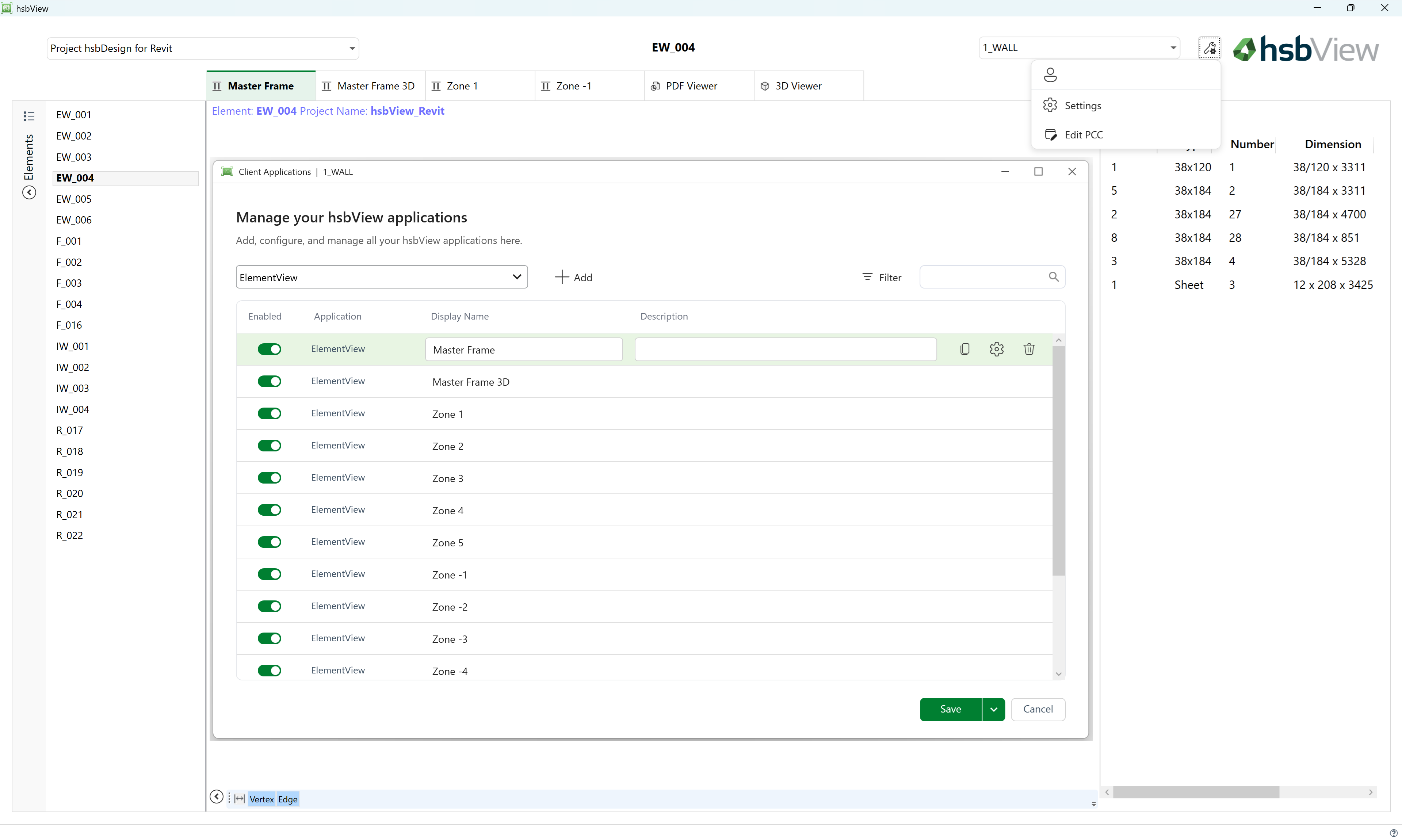

.png)
.png)
.png)